

Local Marketing
Google Business Profile Optimization
The full checklist, the categories trap, and the review rules most guides still get wrong, from someone who manages real profiles.
Learning how to get more Google reviews is mostly learning to ask. Every customer, every time, with your review link sent while the job is still fresh.
Your customers aren't thinking about leaving you a review, even when the service was excellent, because they're thinking about the rest of their day.
So you ask. Every customer, out loud when the job is done, and then you send them the direct review link from your Google Business Profile the same day so leaving a review takes a couple of taps.
Asking is free, and it's allowed. The reviews Google takes down are the ones that came from shortcuts, like a discount in exchange for a review or only asking the customers you already know are happy.
I'd get this right before you spend a dollar on ads, because reviews sit next to your profile and your website as the free part of most local marketing strategies.
The short version

Ask when the customer is happiest with you, which for most businesses is the moment the work is done. The haircut's finished. The car is back in the lot, the event is over and the room is getting cleaned.
Every step after that is about making the review easy to leave later, on their own time.
Do this one on a computer. Open your Business Profile, select Read reviews, then Get more reviews, and copy the link. The same screen has a QR code you can print, and it only generates in a computer browser, so don't go hunting for it on your phone. Google's help page walks through both.
Some guides walk you through building a Google review link by hand from your Place ID. The Get more reviews button gives you the link without that step.
Tell the customer that reviews are how new people find you, and that you'd appreciate an honest one when they get a minute. Then let them go.
Don't make them do it in front of you. Google's rules say a business shouldn't require or pressure customers to leave a review while they're still on the premises, so the ask happens at the counter and the review happens later, on their own phone.
Text it, email it, or print it on the receipt. A thank-you email works, so does the end of a chat, and so does the QR code printed on a sign in your store. You can send the request by WhatsApp or a Facebook post too, wherever your customers already talk to you.
Customers need a Google Account to leave a review, and it can be set up with any email address, so it doesn't have to be Gmail. Say that in the text, for the customer who would otherwise stop at the sign-in screen. If you run a repair shop, the text marketing side of appliance repair shows where the review request sits next to the reminder texts on an account I run.
At Studio 87 this step ran itself. After every event the client got an email through HoneyBook and a text from the venue's phone system asking for a review, so the ask went out whether I remembered it or not.
That includes the customer whose job had a hiccup. You don't know who's going to write the kind review, so ask everyone.
Picking only the people you think will leave positive reviews is what's called review gating, and it's one of the shortcuts that gets reviews removed. So is asking for five stars, or telling customers what to write.
People mean to leave a review and then the day gets away from them. A follow-up catches the ones who forgot, so send one, and if they still haven't gotten to it, follow up again with the same honest ask and the same link.
Replies are public, so every one you write gets read by the next customer deciding whether to call you. The bad ones take more care, and replying to a negative review has rules of its own.

Google allows you to ask any customer for an honest review. What it doesn't allow is anything that changes who reviews you, what they say, or what they get for it. Those rules sit in its Maps content policy, under fake engagement and rating manipulation, and they apply to the business doing the asking as much as to the customer writing the review.
| What you do | Google's policy | Where Google says so |
|---|---|---|
| Asking every customer for an honest review | Allowed | A business can ask for reviews of a genuine experience, as long as it offers nothing in exchange and doesn't try to influence the rating or what gets written. |
| Putting your review link or QR code on receipts, thank-you emails, chats and a sign in the shop | Allowed | Google's own help page on review links suggests all four places. |
| A discount, a free service, a gift card or cash for a review | Not allowed | Google bans incentives "such as payment, discounts, free goods and/or services" for posting a review. |
| Anything in exchange for changing or deleting negative reviews | Not allowed | The same incentive rule covers the revision or removal of a negative review. |
| Asking only the customers you think are happy | Not allowed | Google bans businesses that "selectively solicit positive reviews from customers," which is what people call review gating. |
| Asking for five stars, or telling customers what to write | Not allowed | A business may not request that specific content be included, or try to influence the rating. |
| Pushing a customer to leave the review before they leave the shop | Not allowed | Businesses shouldn't require or pressure customers to leave reviews while on the premises. |
| Review quotas for staff, or asking reviews to name an employee | Not allowed | Both are named in the policy, staff told to collect a set number of reviews and reviews asked to identify a staff member. |
| Reviews from employees, former employees or family | Not allowed | Content based on a conflict of interest, including employment and family relationships, counts as rating manipulation. |
| Buying reviews, or posting reviews from several accounts | Not allowed | Paid reviews and content posted from multiple accounts by one person are fake engagement, and Google removes them. |
Breaking these costs you more than the reviews. They come down, and on top of that the profile itself can be restricted, with no new reviews for a set period, your existing reviews unpublished for a set period, or a warning on the profile telling customers that fake reviews were removed. The Business Profile help lists all three.
There's a federal rule on top of Google's, too. The FTC's rule on consumer reviews, in effect since October 21, 2024, prohibits fake reviews, paying for reviews on the condition they're positive, and suppressing negative reviews.
Reviews are one part of the profile, and the rest of it, the categories, services, photos and posts, has its own checklist in Google Business Profile optimization.

Studio 87 was the event venue I built and ran in the Baltimore area, and it has since closed. It sat on a quiet street with no foot traffic, so people had to find it online before they could find it at all, and SEO was the engine that kept it alive.
The Google numbers cover October 2021 to December 2024. The 250-plus counts every platform the venue was listed on, and Google's share of it is the 220.
And the asking was the same every time.
Every booking ran through HoneyBook, the CRM I started using at Studio 87. After each event HoneyBook emailed the client asking for a review, and a text went out from the venue's phone system asking the same thing.
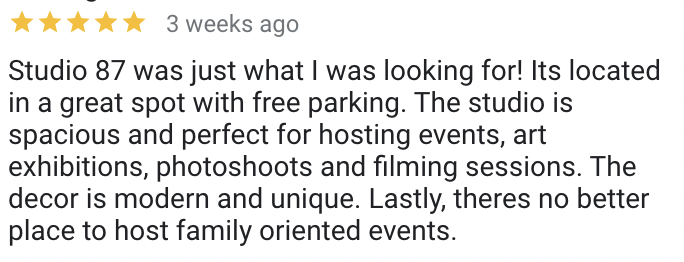
A review like that one does more for the next customer than the stars do, because it names the free parking and what people actually hosted there.
Eight of the 228 weren't five stars, and that's fine. A mix of positive reviews and negative reviews often feels more trustworthy to the people deciding, and Google's own help says the same.

Reply to all of them, and keep it short.
Google's guidance on replies is to be professional and polite, keep it brief, and leave deals and promotions out, since the person who reviewed you is already a customer.
Where owners get in trouble is detail. A reply is public, and people can report an owner's reply the same way they report a review, so a last name, an appointment date, an invoice number or the details of the job have no place in it.
With negative reviews you're writing for the next person who reads them, more than for the person who left them. If a review is fake or a personal attack, report it from the profile. If it's an honest bad review, the calm reply is the tool you have.
Most of what turns into a good review happens before the ask, in how the customer was treated, which is the whole argument for customer service in marketing.

Google reviews usually disappear because they were removed for a policy violation like spam, and once that happens they don't come back. The other reasons on Google's help page on missing reviews are smaller.
Don't answer a drop with a burst of asks. A sudden pile of new reviews is the kind of unusual pattern that counts as rating manipulation, so keep the same steady ask going.
And if a real customer's review vanished, ask them to check their email. Google can send the reviewer a note saying it was removed, with an option to appeal.
If the whole profile vanished and not just the reviews, you're asking why is my business not showing up on Google at all, and that has its own causes and its own checks.

For the asking itself, you probably don't need to hire anybody.
A review link, a text you can paste and the habit of sending it after every job is a system you can run yourself, and I ran mine at Studio 87 with one virtual assistant. Where help pays for itself is the rest of the profile and everything it points to, from the categories and the photos to the replies and the website a customer lands on after reading your reviews.
That's the work I do as a Baltimore SEO company. Google Business Profile management, replies to your Google reviews included, comes with every monthly plan, and plans start at $800 a month. Let's have a conversation about your business, where your reviews stand and what I'd change first.
Paste your Business Profile link or say roughly how many Google reviews you have, and I'll tell you what I'd change first in the way you ask.
Last 90 days, across the sites and Search Console/GA4 accounts Another Monday manages. Figures as of August 2026.
Getting more Google reviews for free comes down to asking every customer for an honest review and sending them the direct review link from your Google Business Profile the same day. The link and its QR code cost nothing, and Google suggests putting them on receipts, in thank-you emails, at the end of a chat and on a printed sign in your store.
Increasing your Google reviews takes a steady ask that goes to every customer the same way, with your review link attached so leaving one takes a couple of taps, and a reply on the reviews you already have so the next customer can see someone reads them.
Buying Google reviews breaks Google's policy, which removes reviews that were paid for directly or in kind. Google can also restrict the Business Profile that bought them. Buying fake reviews, or paying for reviews on the condition that they're positive, is prohibited by the FTC's rule on consumer reviews too, in effect since October 21, 2024.
Getting 1,000 reviews on Google takes enough genuine customers to write them and an ask that reaches every one of them, so the number follows your customer count and how consistently you ask. Bought reviews and unusual bursts of reviews are both things Google's policy treats as manipulation and removes.
Your Google review link lives in your Google Business Profile. On a computer, open the profile, select Read reviews, then Get more reviews, and copy the link. The same screen offers a QR code, and that code can only be generated in a computer browser, not on a phone.
Offering a discount, a gift card or anything else of value for a Google review is against Google's policy, even when you don't ask for a positive one. Google treats incentivized reviews as fake engagement, removes them, and can add restrictions to the Business Profile on top of that.
Review gating is asking only the customers you expect to be happy for a review, or screening customers first and sending only the satisfied ones to Google. Google's policy bans businesses from selectively asking for positive reviews, so the same ask has to go to everyone.
Asking customers for a five-star review goes against Google's policy, which lets a business ask for reviews only when it isn't trying to influence the rating. Ask for an honest one.
Employees, former employees and family members shouldn't leave Google reviews for your business, because Google counts reviews based on a conflict of interest as rating manipulation and removes them.
Customers need a Google Account to leave a Google review, and they can create one with any email address, so a Gmail address isn't required.
Replying to every Google review, positive and negative, shows the next customer that someone reads them. Google's guidance is to keep replies short, professional and free of deals or promotions. Never put a customer's private details in a reply, because replies are public and people can report them.
Google reviews usually disappear because they were removed for a policy violation like spam, and reviews removed for a violation won't be restored. A new review can also take a few days to appear while it's checked, and reviews can lag for a few days after two Business Profiles are merged.
A business can't delete a Google review from its own profile, but it can report one that breaks Google's content policies, like a fake review or a personal attack. For honest negative reviews, a calm public reply is the tool you have, and it's written for the next customer reading it.
More operator playbooks from The Marketing Department.
The full checklist, the categories trap, and the review rules most guides still get wrong, from someone who manages real profiles.
Not on Maps, there only for your exact name, in the wrong spot, suspended or stuck on Pending: what each one means and the check for it, from Google's own help pages.
It gives you exactly what you ask for. What Lovable handles for search on its own, checked against its docs, and the parts you have to know to ask for.
A free 30-minute strategy session with the person who'd be doing the work. Bring your Business Profile link.
¡También Hablamos Español!