Tool review, written from daily use HoneyBook CRM: An Honest Review, Five Businesses In
I run Another Monday, my marketing shop in Baltimore, on HoneyBook, and my event venue ran on it before that. Five businesses, one login, since 2021.

On this page
- What is HoneyBook CRM?
- Real results from five businesses on one platform.
- How much does HoneyBook cost?
- What software does HoneyBook replace?
- The HoneyBook features that earn their keep.
- Automations, workflows, and HoneyBook AI.
- What is HoneyBook actually like to use?
- Integrations, and getting your data in.
- HoneyBook vs Dubsado: which one?
- Who is HoneyBook CRM for?
- What happened when a venue client switched.
- Setup decides everything.
- HoneyBook CRM questions, answered from daily use.

Affiliate disclosure: some links on this page are HoneyBook referral links. Sign up through one and you get a discount on your first year, and HoneyBook pays Another Monday a commission at no extra cost to you. Every number on this page comes from our own accounts, our own clients, or HoneyBook's published pricing page.
What is HoneyBook CRM?
HoneyBook CRM is a client relationship management platform built for independent, service-based businesses.
Lead forms, proposals, contracts, invoices, scheduling, and payments all live in one account, and every screen is built around what your client sees at that step of the job.
- What it is. One account holding lead capture, smart files, e-signatures, invoicing, scheduling, and payments.
- Who it's best for. Service businesses that book clients one job at a time and quote before they invoice.
- What it costs. $29 a month at the bottom and $109 at the top when you pay yearly, plus 2.7% and 10 cents on card payments.
- What it replaces. A scheduler, an e-signature tool, an invoicing app, a forms builder, and the spreadsheet holding them together.
- Where it falls down. No inventory system, so retail and restaurants should look elsewhere.
- My verdict. Worth the money if you book clients, and worth nothing if the setup never gets built properly.
I'm Willis Aybar, and I've run service-based businesses since 2009. Five of them have lived on HoneyBook since 2021: Studio 87, the event venue I ran in Baltimore, plus its photo booth arm, my photography business, and OpenDoors360, my virtual tour company.
The fifth is Another Monday, the Baltimore marketing agency where my team sets this software up for clients.

I've sent the proposals, chased the invoices, and watched a lead form catch an inquiry at 11pm that would have died in my inbox.
The best CRM isn't the one with the most features. It's the one you'll open every day.
Real results from five businesses on one platform.
When I opened Studio 87 in 2021, I was drowning in admin. Tour inquiries hit Instagram, contracts hid in email threads, invoices went out late, and follow-ups lived in my head.
I wanted payments reconciled fast and a pipeline I could read at a glance, and what I had instead was a stack of business tools that never talked to each other. HoneyBook became the home for all five.
The venue booked 380+ events through it, and once I built the automated workflows they carried most of the client communication. My photography customers got proposals with shot lists and delivery dates, and I could send an invoice from my phone between shoots.
businesses I've run on HoneyBook
events the venue booked through it
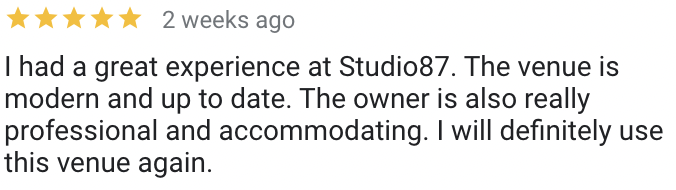
five-star reviews the venue earned along the way
Three of those Studio 87 reviews. Every booking behind them ran through HoneyBook, from the first inquiry to the final payment.


The agency runs client projects and invoicing through the same login, and the mobile app shows me any payment status while I'm standing in line for coffee. Better organization books more clients, because nothing falls through the cracks.
The automations send the follow-ups I would've forgotten, and a proposal that lists the add-ons raises the average project value because the customer finally sees them. The client numbers we can publish live in our case studies.
The system I set up for clients is the one I run my own companies on.
How much does HoneyBook cost?
HoneyBook offers three plans, plus a 30-day free trial that runs without a credit card and a 60-day money-back guarantee once you subscribe. Everything below is the yearly rate.
| Plan | Price | What you get |
|---|---|---|
| Starter | $29 a month $348 a year | Unlimited clients and projects, invoices, contracts, payments, and up to two lead forms. No automations at this tier, which is the line that matters most. |
| Essentials | $49 a month $588 a year | Everything in Starter plus automations, the scheduler, the QuickBooks sync, SMS reminders, and up to two team members. This is the tier the software is really designed around. |
| Premium | $109 a month $1,308 a year | Unlimited team members, priority support, and multiple companies under one login. That last feature is how I keep five businesses separate without five subscriptions. |
Plan prices come from HoneyBook's own pricing page. Software pricing moves as features ship, so read the live page before you put a card in.
HoneyBook doesn't take a percentage of your revenue. Card fees start at 2.7% plus 10 cents and bank transfers run 1.5%, which lands about where Square or Stripe would put you.
That gap is worth designing around.
On a five thousand dollar venue booking the bank transfer saves about sixty dollars, so I set the default payment method to bank transfer and leave card as the fallback.
The tier that trips people up is Starter. What it offers is real, with unlimited clients and projects and payments working the day your account opens. What it does not offer is automations, and automations are the reason to buy a CRM at all.
So price the plan you'd actually use. If that's Essentials, $588 a year is the number to hold up against everything you're paying for separately, and Starter is closer to an extended trial than a plan you'd stay on.
The most expensive CRM is the one your leads never make it into.
What software does HoneyBook replace?
Before you compare the subscription to zero, compare it to the pile you're already paying for.
| The job | The usual separate tool | Inside HoneyBook |
|---|---|---|
| Catching leads | A forms builder bolted onto the website | Lead forms that feed the pipeline directly |
| Proposals and contracts | A document tool plus an e-signature service | Smart files a client reads, signs, and pays in one pass |
| Getting paid | An invoicing app plus a card processor | One checkout with card, bank transfer, and payment plans |
| Booking meetings | A standalone scheduler | A scheduler reading your real calendar |
| Remembering to follow up | A spreadsheet and your memory | Automations firing on the project stage |
Add your own numbers to that middle column and the comparison stops being theoretical.
Most owners I sit across a table from are already paying for four of those five, and none of the four share a single piece of data with each other.
The honest counter-argument is that a stack of specialists usually beats an all-in-one on any single feature. A dedicated e-signature tool has more options, and a dedicated scheduler has more availability rules. You're trading a little depth for everything living in one place.
Count what you're paying now before you call this expensive.
If you'd rather keep shopping, the HoneyBook alternatives worth a trial are Dubsado and 17hats, with Bonsai worth a look if you freelance solo. Compare them on the features you'd touch every week, not the feature matrix on the pricing page.
The HoneyBook features that earn their keep.
Every CRM demo shows a pretty dashboard. The best test is which features you still use in month six.

The business that answers first usually gets the booking.
The project management side is plain, and it's what holds a busy month together. Files and email threads stay attached to the project they belong to, the calendar shows upcoming meetings next to each job, and questionnaires collect feedback while it's fresh.
Set the smart fields once and every file pulls the right client details, while the reports show booked revenue and lead sources. That reporting is thin next to real business intelligence software, and for a business booking twenty jobs a month it's enough to see where the work is coming from.
Automations, workflows, and HoneyBook AI.
An automation in HoneyBook is a trigger and an action.
Something happens to a project, and the software sends the email or attaches the file without you touching it. That's the whole idea, and everything else is arranging it.
At the venue, a tour inquiry triggered a brochure and an availability question within a minute of the form landing, then a follow-up on day three and another on day seven if nobody replied. I did not write those three emails 380 times. I wrote them once.
A lead form is submitted
Brochure and pricing email sends
Three days, no reply
Follow-up email and a task on your list
Workflows chain those steps into a sequence you attach to a project type, so a wedding runs one path and a corporate booking runs another. Building them is the work, and it is also the whole return: the automations keep running on the weeks you are too busy to be organized.
What to automate first. The inquiry reply, every time. Automate the message that goes out in the first five minutes and you've already fixed the leak most small businesses lose money to.
After that, automate the payment reminder and the day-before note. Leave anything that needs a human read alone, because an automation that sounds automated costs you more than the minute it saved.
The AI features sit on top of that. HoneyBook AI drafts the email or the proposal copy from a prompt, and it's genuinely useful for a first pass on a message you send often.
It is not useful for anything the client should feel was written by a person. I use the AI to get past the blank screen and then rewrite it in my own words, which takes two minutes and reads like me. If you want AI answering questions on your website after hours, that is a different job for an AI chatbot pointed at your lead forms.
A workflow you build once keeps working on your worst week.
What is HoneyBook actually like to use?

The user experience is the reason most owners stay. The screens use plain words instead of CRM vocabulary, a project reads top to bottom like a story, and you can find an unpaid invoice in two clicks from anywhere in the software.
The client experience matters more, and it's the part most reviews skip. Your own experience of the software is a few hours a week, and theirs is the impression your business makes. Your customer never logs into a CRM. They open one branded page holding the proposal they're reading and, when they're ready, the contract and the invoice behind it, and that page is what tells them you have your business together.
A first-time user gets useful inside a day. I've handed accounts to owners whose heaviest software was a shared calendar, and what every one of those users needed help with was mapping their own process.
Every user on the account sees the same pipeline, which matters the first time somebody covers for you while you're out. The mobile app is good for the things you do standing up. Checking whether a payment landed, replying to a client, adding a lead from a conversation at an event.
Building templates on a phone is miserable, so do that part sitting at a desk with a real keyboard.
The honest complaints, from five years of daily use
It gets slower as your account gets heavier. Years of projects and their attached email threads loading into one view will make you wait. Archiving finished work fixes most of it, and new accounts feel quick, which is why the complaint comes from long-time users.
The templates are rigid in the places designers care about. You can brand a smart file and you cannot build any layout you want. If your proposal is a portfolio piece, this will annoy you.
The email sending is a shared reputation. Messages sent from inside a platform can land in promotions, so I connect Gmail for anything that matters and keep the automated sends for the transactional messages.
Customer support is chat and email. Priority support is a named line item on the Premium plan, which tells you what the standard tier is. Answers have been fine for me, and I've never needed a phone call to solve a problem.
None of that has moved me off the platform. I put the complaints on this page because a review with no complaints in it isn't honest. HoneyBook isn't the best tool in any single category it touches. Having everything in one login matters more to me than winning any one of those categories would. It stayed easy to learn and easy to keep using the whole time, and that's the part most CRMs lose people on.
Integrations, and getting your data in.
HoneyBook integrates with QuickBooks, Gmail, Google Calendar, and Zoom directly, and Zapier covers the thousands of apps it does not. Photographers connect Pic-Time for gallery delivery, which is the one vertical integration I get asked about most.
The two questions people search for and rarely get answered: there is no native Google Sheets or Google Drive integration. Zapier is the bridge for both, so a booked project can drop a row on a sheet or a signed contract can copy itself into a Drive folder.
Both gaps are worth knowing before you plan a migration around a spreadsheet you already live in. Zapier handles it, and Zapier is one more subscription and one more thing that can quietly stop firing.
The Google side is one reason we set clients up on Google Workspace first, and we run client dashboards out of Notion alongside it. The three tools handle different jobs and none of them fight.
Bring the client data over
Export your contacts from wherever they live and import the list, so every past customer is searchable from day one.
Rebuild the files, don't copy them
Your proposals and contracts get rebuilt as smart files with real fields. Pasting a PDF in defeats the point.
Move the live jobs by hand
Anything mid-flight gets entered manually with its real stage and balance, which is a day of work and worth every hour.
Migration is where most switches die.
Owners import the contacts, run out of steam before the templates get built, and end up paying a monthly fee for an address book. The order above exists because I've done it backwards.
HoneyBook vs Dubsado: which one?
I run five companies on HoneyBook and none on Dubsado, so read this as one operator's view rather than a bake-off.
Most reviews that score both were written by somebody who sells setup services for one of them, which is worth knowing before you weigh the scores.
The software you finish the trial in is the one you'll still be using in year two.
The two compete for the same business: a service owner who quotes, books, signs, and invoices.
Where they split is what each one optimizes for, so the choice comes down to which trade you'd rather make on the day you sit down to build the thing.
| If this is you | Try HoneyBook first | Try Dubsado first |
|---|---|---|
| Your priority | Being live and taking payments this week | Bending every form and workflow to your exact process |
| Your patience for setup | You want templates to start from | You'll happily build from a blank canvas |
| What your client sees | Matters a lot, and you want it clean by default | Matters a lot, and you want control over every pixel |
The real test costs nothing. Open both free trials, build the same proposal in each, and notice which one you actually finish.
Who is HoneyBook CRM for?
HoneyBook works best for the independent business owner who sells services and books clients.
Every plan includes unlimited clients and projects, every plan can accept payments, and team access scales to unlimited users on the Premium tier.
- Photographers and videographers. Shot lists, delivery dates, and a gallery tool that connects.
- Event venues and wedding planners. Packages with add-ons, deposits, and payment plans that run to the event date.
- DJs, florists, caterers, and photo booths. Fast quotes on a date that either is or isn't available.
- Coaches, consultants, interior designers. Ongoing work where the proposal is the sale.
- Therapists and doulas in private practice. Intake questionnaires and scheduling off a real calendar.
- Anyone with a crew. Multiple team members on one pipeline, with the owner still able to see everything.
It's a small business CRM at heart, and that focus is what keeps it usable. The project management here is the light kind: a job per client, a stage you can read at a glance, and a due date that nudges you when it gets close. The repeating tasks go to the automations.
Who shouldn't buy it? Retail and restaurants. HoneyBook manages client relationships, bookings, and the money that follows, and there's no inventory system inside it. If your revenue comes from products on a shelf, look at other tools.
An inbox mixes every inquiry in with everything else, so the lead follow up only happens when you remember. Once the reminders live in the software, they go out on a schedule.
What happened when a venue client switched.

One of our venue marketing clients is an event space just outside DC. Before HoneyBook, the owner ran bookings on pen and paper and spreadsheets, and collected payments across Zelle, Square, and CashApp.
The setup grew one tool at a time, each one made sense the day she added it, and she wanted the admin off her plate. We moved the operation into HoneyBook and rebuilt her proposals so each one lists the venue packages beside the upsell options she already offered: tables, chairs, linens, decor, bar service, coordination.
Clients check the boxes they want and the total updates itself. Those add-ons generate over 100% more revenue than her base rental fees, and her upsell rate climbed more than 50%.
| Part of the business | The old way | Inside HoneyBook |
|---|---|---|
| Payments | Three payment apps, reconciled by hand at the end of the month | One checkout with credit card, bank transfer, and payment plans |
| Contracts | Printed, signed, filed in a drawer | E-signed online, stored with the project |
| Leads | DMs, voicemails, sticky notes | Lead forms that feed one pipeline |
| Upsells | Mentioned when she remembered | Built into every proposal as add-ons |
An upsell built into the proposal sells itself.
Venues feel this harder than most, because venue booking software gets expensive fast. If you run a space, read our write-up on whether event spaces are profitable next.
Setup decides everything.
Owners who try HoneyBook and quit almost always fail at the same point, and it is the setup.

They sign up, poke at a blank template, click two buttons, send one test invoice, and drift back to the inbox within a week. Then they tell their industry friends the CRM didn't work.
A CRM starts saving time once somebody who understands your client process maps it into one place. What happens the minute a lead form comes in, which emails go out after booking, which triggers fire the payment reminders, and what the client sees at every stage.
Without that map, the account ends up holding contact details and little else, which is a $588 a year way of storing phone numbers.
Map the client journey
We chart how a lead finds you, books you, and pays you, and where the current process leaks inquiries.
Build it into HoneyBook
Lead forms, smart file templates, pipeline stages, automations, client emails, and payment schedules that match how you work, carrying your branding from the first click to the paid invoice.
Hand you the keys
You get a working system, plus the training to run it yourself and change it as the business changes.
$1,500 one time
Your website's lead forms wired in, smart file templates for the proposals, contracts, invoices, brochures and questionnaires you actually send, the client emails at every stage, the automations behind them, your pipeline stages, and a proper secure setup for you and your employees.
- Three months of calls, not one. An hour a month for three months after it goes live, because the questions that matter turn up in week six rather than on handover day.
- Built around your process, not a template pack. We map how a lead actually finds you, books you, and pays you first, then build that.
- You get the keys. Training so you can add a file, change a workflow, and manage the account yourself. The system stays yours.
We've built this for our own five businesses and for clients in event venues, plant retail, appliance repair, and auto body, and I teach marketing and AI to small business owners around Baltimore.
The three months of calls exist because handover day is the wrong day to answer questions. You don't know what you need to ask until you've run twenty real projects through it.
If HoneyBook is the wrong fit for how you work, I'll say so and point you somewhere better.
HoneyBook CRM questions, answered from daily use.
Is HoneyBook a CRM?
HoneyBook is a CRM, built specifically for service businesses that book clients. Alongside client relationship management you get lead forms, payments, proposals, contracts, invoices, and scheduling in one account, which is why owners often use it to replace three or four separate tools.
What exactly does HoneyBook do?
HoneyBook manages the client side of your business from first inquiry to final payment. The platform captures new leads, sends proposals, collects signatures, schedules meetings off your real availability, fires payment reminders, and tracks every project in a pipeline you can read at a glance.
How much does HoneyBook cost per month?
HoneyBook pricing runs $29 a month for Starter and $49 for Essentials when you pay yearly, with Premium at $109. Monthly billing costs more. Automations start at the Essentials tier, so Starter is the trial-in-disguise rather than the plan most businesses stay on. Prices move as features ship, so read the live pricing page before you commit.
What does HoneyBook charge per transaction?
HoneyBook card fees start at 2.7% plus 10 cents and bank transfers run 1.5%, which is the same shape of deal a Square or Stripe account would give you. The bank transfer rate is the one worth pointing your bigger clients at, because on a five thousand dollar booking the difference pays for a month of the subscription.
Does HoneyBook take a percentage of my sales?
HoneyBook doesn't take a cut of your revenue. The platform charges processing fees when a client pays through it, and bank transfer payments cost less than credit cards. You pay the subscription and the processing, and the bill stops there.
Is there a free HoneyBook plan?
HoneyBook has no permanently free plan, only a 30-day free trial that does not ask for a credit card. Thirty days is enough to build one real proposal and send one real invoice, which is a far better test than clicking through the demo data.
Is HoneyBook good for beginners?
HoneyBook is one of the easiest CRMs to learn and a reasonable first CRM for an owner who has never run one. The interface reads plain, the templates give you a running start, and there are tutorials covering most industries. The buttons are easy; mapping your client process is the hard part.
Why does HoneyBook feel slow sometimes?
HoneyBook can feel slow on a heavy account, and the usual culprit is volume rather than the software. Years of projects and their attached files all load into one view, so a long-time user waits where a new one doesn't. Archiving finished projects and trimming dead templates fixes most of it, and on a fresh account the platform is quick.
Is QuickBooks or HoneyBook better?
QuickBooks and HoneyBook do different jobs. QuickBooks is accounting software, and it's what most bookkeepers use. HoneyBook runs the client side: leads, booking, contracts, invoices and payments. The two integrate, so plenty of small businesses run both and let HoneyBook feed QuickBooks the numbers.
Does HoneyBook integrate with the tools I already use?
HoneyBook integrates with QuickBooks, Gmail, Google Calendar, and Zoom, and Zapier opens the door to thousands of other apps. Photographers can connect Pic-Time for gallery delivery. Where a tool has no direct integration, Zapier usually provides the bridge.
Can I connect HoneyBook to my Squarespace or Wix site?
HoneyBook lead forms embed on a Squarespace, Wix, WordPress, or custom-built site using a snippet of code you paste into the page. The form carries your branding, and a submission lands straight in the pipeline instead of an inbox, which is the whole point of putting it there.
What is like HoneyBook but cheaper?
Dubsado, 17hats, and Bonsai are the HoneyBook alternatives that compete on price, and some of their tiers undercut it. Compare them on the features you'll use every week, then count what switching costs you in hours.
Which is better, HoneyBook or Dubsado?
HoneyBook and Dubsado solve the same problem for the same kind of business, and I run five companies on HoneyBook and none on Dubsado, so treat my read as one operator's rather than a bake-off. The honest test is to build the same proposal in both trials and see which one you finish.
How do I cancel HoneyBook?
Canceling HoneyBook happens in your account settings under the subscription section, and the account stays open until the end of the period you already paid for. Export your client data and download your signed contracts before the account closes, because getting them afterwards means asking support for a favor.
Is HoneyBook legit?
HoneyBook is a legitimate, established platform that processes real client payments for service businesses, and I've moved five of my own companies' money through it since 2021. The thing worth checking before you trust any CRM with your invoicing is the payout timing, because that is the part that touches your cash flow.
Is HoneyBook worth it for a small business?
HoneyBook is worth it for small business owners who book clients, and I say that as someone who's run five of my own businesses on it. One recovered booking usually covers months of the subscription. If you sell physical products off a shelf, it's the wrong tool.
Do I need an LLC to use HoneyBook?
An LLC is never required to open a HoneyBook account. Sole proprietors and freelancers use it every day, and so do people running a side hustle out of a spare room, and you can add business details later as you grow. Whether an LLC makes sense for you is a question for your accountant.
Can Another Monday set up HoneyBook for me?
Setting up HoneyBook for a client is regular work at Another Monday, and a full setup runs $1,500 one time. It covers your website's lead forms, your smart file templates, the client emails, the automations behind them, your pipeline stages, training so you can run it yourself, and an hour on the phone with me every month for the first three months. Book a free strategy session and we'll scope what your business needs.
Inquiries living in your inbox?
Walk me through how you handle them today and I'll show you what I'd change.
- 450K+ search impressions across the sites we manage
- 5,800+ organic search clicks across the sites we manage
- 600+ leads and booking requests across the sites we manage
Last 90 days, across the sites and Search Console/GA4 accounts Another Monday manages. Figures as of August 2026.
Done duct-taping five apps together?
Grab a free strategy session and we'll map your client process before you touch a template. If a full setup is what you want, that's $1,500, and it comes with three months of calls so you're not on your own the first time something needs changing.
¡También Hablamos Español!