


Customer Service
Lead Follow Up: Why Your Leads Ghost You
What the published data says about price, reply speed and how many times to follow up, with every source rated for how much to trust it.
Setting up Google Ads account access for your agency takes about 15 minutes, and when it's done, the account should still belong to you. I manage Google Ads for local businesses at Another Monday in Baltimore, and this is the walkthrough I send every new client: create the account under your own email, claim the ad credit, skip the setup traps, and share access the safe way.

You create the account yourself at ads.google.com with your business email, pick the ad credit offer you can realistically hit, skip Google's push to build a campaign on the spot, confirm your settings, then send your agency the 10-digit account ID so they can request manager access.
You approve that request from inside your own account, and that's the whole job.
Quick definition for anyone starting from zero: Google Ads is Google's pay-per-click advertising platform. Your ad shows up when someone searches for what you sell, and you pay when they click. It's the fastest way I know to put a local business in front of people already looking for it, and it's one of the two engines I run for clients at Another Monday here in Baltimore.
This guide exists because new clients kept asking the same fair question: can't you just set the account up for us? I could. I won't, and the reason matters.
The account that holds your payment method, your campaign history, and every scrap of performance data should be owned by you, not rented from whoever happens to manage it.
Skimming? Here's the whole post in five lines:

You'll need your business email, a payment card, and a few uninterrupted minutes.
Here's the exact path, in order.
No Google account yet? Create one, since a free Gmail address technically works for everything that follows. If you run a business, though, spend the little extra and get email on your own domain, you@yourbusiness.com instead of yourbusiness@gmail.com.
It reads professional on every invoice, quote, and review reply you'll ever send, and it's the address your entire ad account will live under. I broke down the cost and the setup in my guide to Google Workspace for small business.
Already have a solid business email? Skip ahead. That was easy.
Head to ads.google.com, or search Google Ads and click the first result, then sign in with the email from step one. Google will greet you with a big start button and strong opinions about what you should do next. Hold off for a second, because the next two steps are where new advertisers leave money on the table.
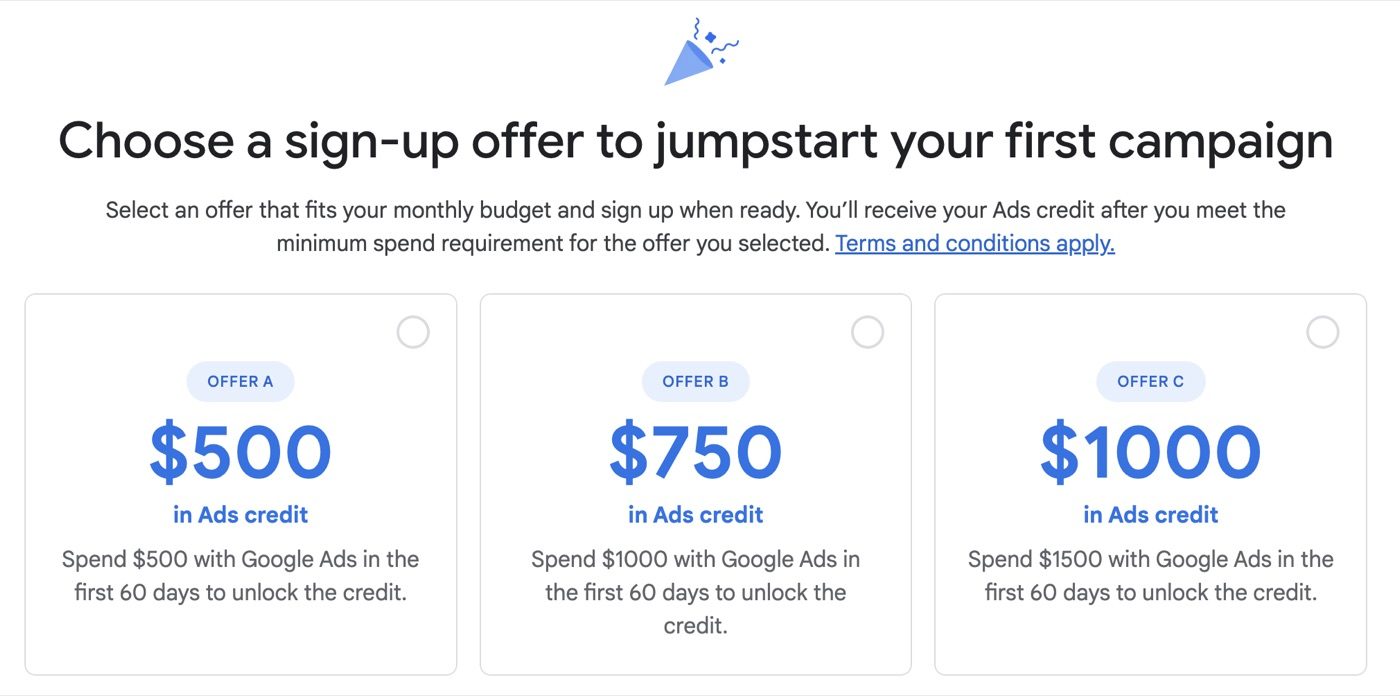
Before you blow past the opening screens, look for the new-advertiser credit. Google usually offers a matching deal to fresh accounts, something like spend $500 on ads within your first 60 days and get $500 in credit back. The exact numbers shift with whatever promo Google runs when you sign up, so read the fine print on your screen, not this paragraph.
Pick the offer you're most likely to hit. Falling short carries no penalty, you simply don't collect the credit.
And if you plan to run real campaigns anyway, this is free budget for checking the right box. Claim it, then keep moving.

Google's setup flow will try to walk you straight into launching your first campaign. If an agency is going to manage your ads, skip everything campaign-related during setup. Google will ask more than once, so keep skipping.
The five-minute wizard picks broad defaults, loose keywords, wide locations, automated bidding with no conversion data to aim at, because it can't know your business yet.
A deliberate campaign starts from your actual customers and your service area, with tracking installed first so every dollar gets measured. Your agency should build the second kind. Don't spend on the first kind in the meantime.
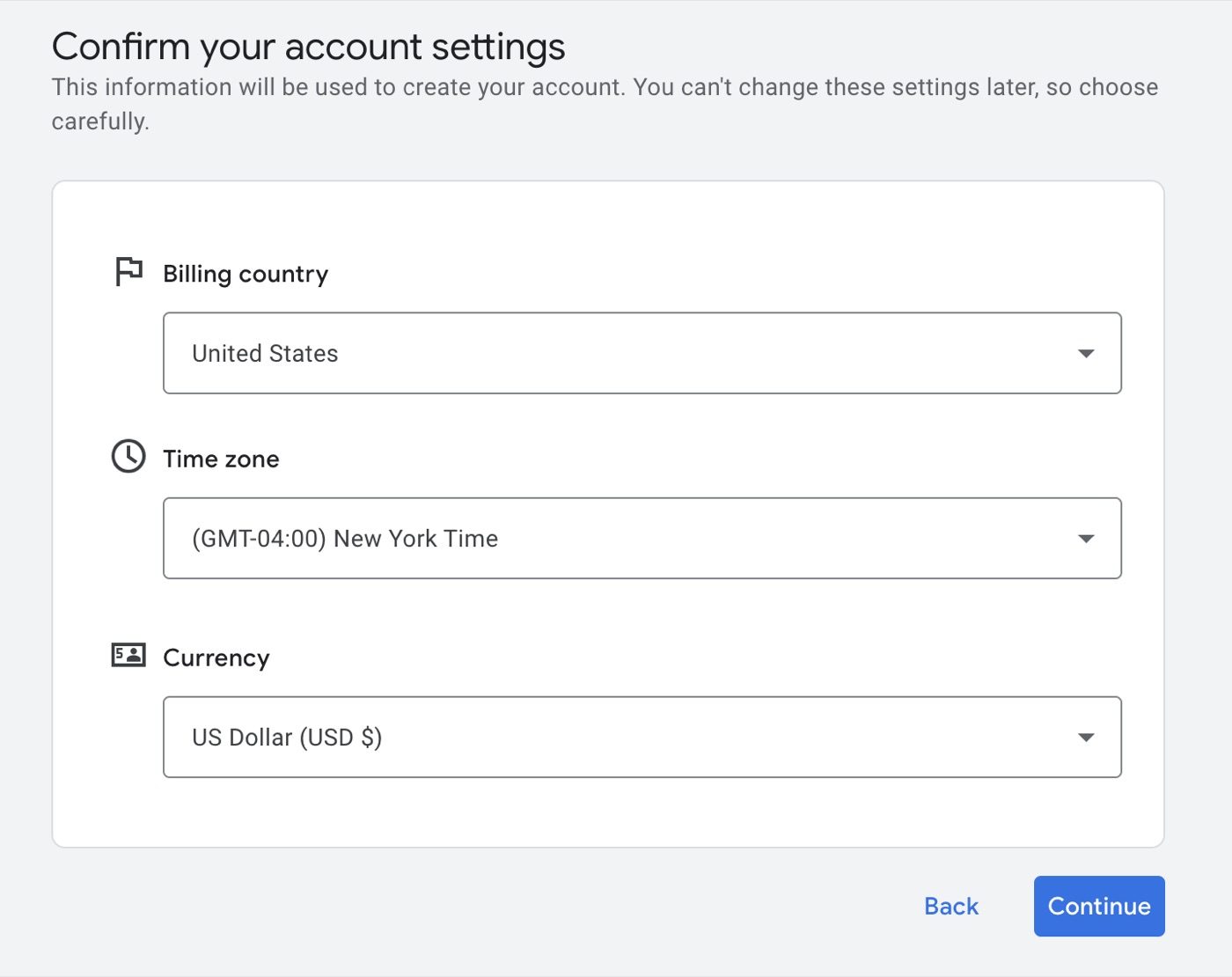
Last stretch. Google asks you to confirm your business information: name, billing country, time zone, currency. This is the one screen worth slowing down for, because a couple of those choices are painful to change once the account exists.
Make sure the time zone matches where you operate and the currency matches how you bill.
Then confirm, and the account is yours.

Sharing access is simpler than it sounds: you send your agency one number and approve the request that comes back.
Once your account exists, a 10-digit ID appears at the top of your Google Ads dashboard, formatted like 123-456-7890.
That ID is the only thing your agency needs from you. Copy it and email it over. Working with us, send it to info@anothermonday.online and I'll take it from there.
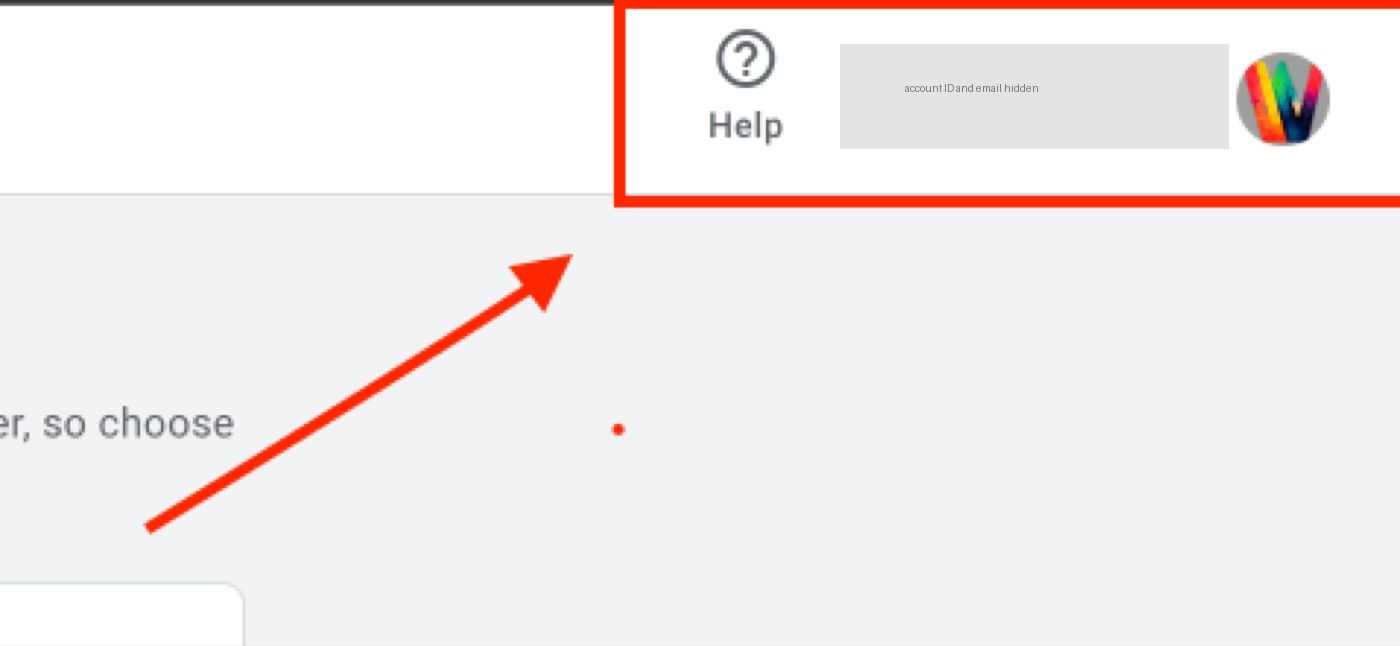
Good to know: the account ID is an identifier, not a password. Sharing it doesn't hand anyone access. It lets a manager account send you a request, which you approve, or ignore, from inside your own login.
Watch for the request. Your agency sends an access request from its manager account, and Google usually emails you a heads-up. From us, it says Another Monday has requested access to manage your account.
Open Admin, then Access and Security. Sign in to Google Ads, head to Admin, then Access and Security, and open the Managers tab. The pending request sits right there.
Click Accept. Approve the request and the handoff is complete. Your agency can build and manage campaigns while the account, the data, and the billing stay in your name.
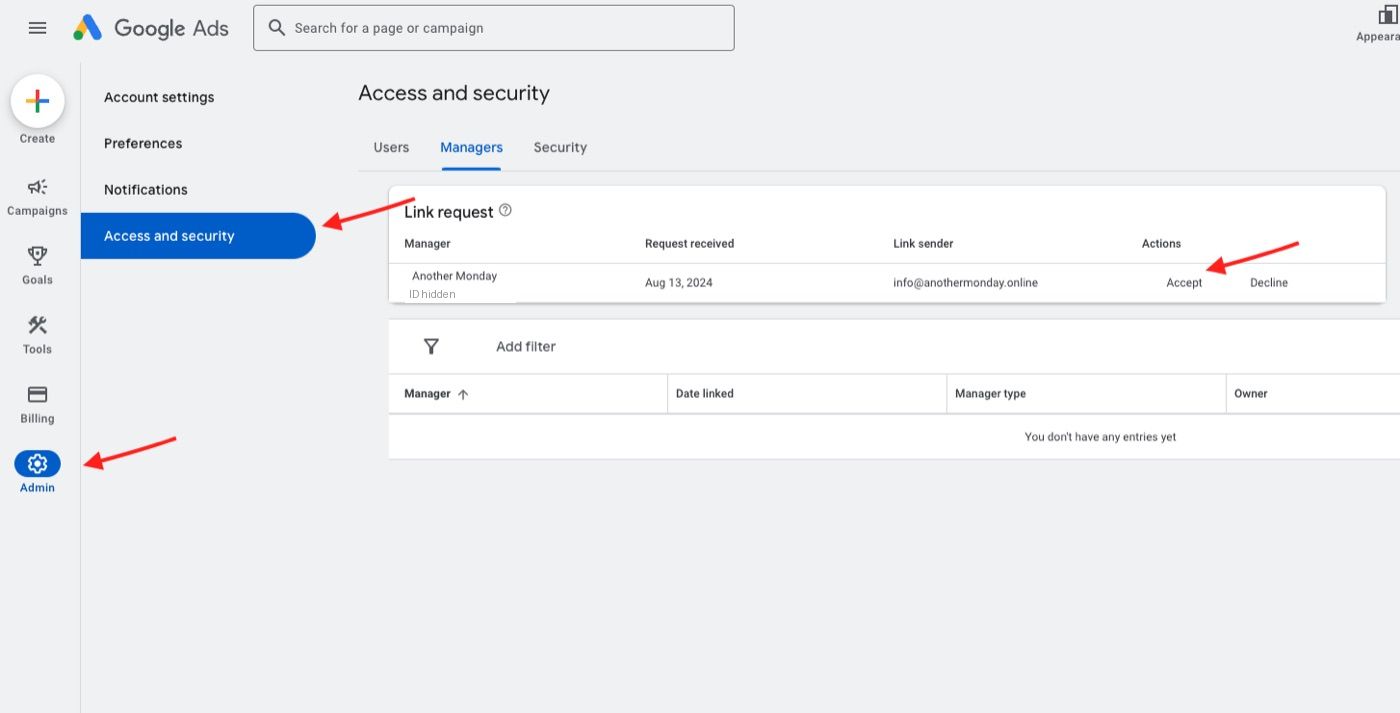
That's the entire handoff. The whole exchange happens inside your own login, so you always know exactly who has access and why. And if you're still deciding who should hold those keys, I wrote about how I run paid search as a Google Ads agency in Baltimore, results included, so you can judge the work before you share a thing.
I'm Willis Aybar, and I get stubborn about exactly one part of onboarding: who owns the account. A Google Ads account grows more valuable the longer it runs. Conversion history teaches Google who your best customers are.
Audience lists build up. The performance record becomes the benchmark every future campaign learns from. All of that belongs to whoever owns the login, so it should be you.
Our arrangement stays simple. We build the system, we run it, and we show you exactly what's working and why. The keys never leave your ring.
| You keep | Your agency gets |
|---|---|
| The account itself, under your business email | Manager access through its own separate login |
| The billing profile and the payment method | The ability to build and manage your campaigns |
| Every campaign, keyword, and result ever logged | The job of showing you what's working and why |
| The power to remove access anytime | Access that lasts exactly as long as you want it to |

The heavy lifting moves to your agency's desk. Conversion tracking gets installed first so every call and form fill is counted, and keyword research maps out what people in your service area type when they need you.
Campaign structure follows what you actually sell, and the ad copy is written to earn the click, not just the impression.
Your job shrinks to approving direction and reading reports that make sense.
Numbers like those come from management, not from setup. The account you created is the vehicle, and Google Ads management is the driver. That page walks through how I structure campaigns, what I report, and what a lead tends to cost. If you're still weighing whether ads or search should get the first dollar, picking between SEO and Google Ads first walks through the decision rule I actually use.
Stuck on a step? Call or text 410-999-0169 and ask. Setup questions are usually quick ones.
If you'd rather keep reading first, I've written more plain-English guides for local business owners, and my small business marketing consultant page lists every way to reach me.
These come from real onboarding calls.
Short answers, the same ones I give on the phone.
Plan on about 15 minutes. The account shell itself is quick: sign in with your business email, claim your ad credit, confirm your settings, and skip the campaign builder if an agency will run your ads. The work that decides your results, keyword research, conversion tracking, and ad copy, happens after setup, and that's the part you hand off.
Before you create an account, have three things ready: your billing information, your website address, and a goal for your first Google Ads campaign. Google walks new advertisers through a guided flow, and the way to skip its campaign builder is to switch to Expert Mode. Creating your first campaign comes after that. For a local business, search campaigns are the place to start, since they show your ads to people already searching on Google Search, while a campaign built for brand awareness reaches people who weren't looking yet. Connect Google Analytics and Google Tag Manager so conversions get counted, and set up Google Merchant Center only if you sell products online. A new Google Ads account is also the moment to decide who owns it, because all the digital marketing that follows depends on you holding the keys.
Nothing, creating the account is free. You only pay when your ads run and people click them, and you set that budget yourself. New accounts usually qualify for a promotional credit too, something like spend $500 in your first 60 days and get $500 back in ad credit, though the exact offer depends on the promos Google runs when you sign up.
You should create it yourself, under your own business email. The account holds your payment method, your campaign history, and every piece of performance data your money ever generated, so it should belong to you. A good agency connects through a manager account request instead of owning your login. That's how Another Monday works: you own the account, we manage it, and you can pull our access anytime.
A manager account, sometimes called an MCC, is the account type agencies use to run multiple client accounts from one login. When Another Monday sends you an access request, it comes from our manager account. You accept it once inside your own Google Ads login, we get the access needed to build and manage your campaigns, and ownership never leaves your hands.
Your account ID sits at the top of your Google Ads dashboard once you're signed in, formatted like 123-456-7890. Copy it and email it to your agency so they can send an access request. It's an identifier, not a password, so sharing it doesn't give anyone control of your account. You still approve or ignore every request yourself.
No, a free Gmail address works fine. Workspace earns its keep for a different reason: email on your own domain looks established to every customer and vendor you write to, and it keeps business accounts separate from your personal inbox. If you're investing in ads anyway, it's a small upgrade that pays off well past the ad account.
Letting the five-minute campaign wizard build your first campaign before any tracking exists, that's the big one. It picks broad keywords and wide locations with no conversion data to aim at, and you end up paying to learn what a deliberate campaign would have known from day one. The other two mistakes are smaller but avoidable: skipping the new-advertiser ad credit because nobody looked for it, and rushing the settings screen, then having to live with the wrong time zone or currency.
More operator playbooks from The Marketing Department.
What the published data says about price, reply speed and how many times to follow up, with every source rated for how much to trust it.
From someone who runs both channels for the same local businesses: real costs, real timelines, and the decision rule that picks between them.
Picking a Wix alternative is the easy part. Getting your website out is where it costs you, because Wix doesn't hand it back when you go.
Say what you sell and where, and I'll tell you what I'd build first.
Last 90 days, across the sites and Search Console/GA4 accounts Another Monday manages. Figures as of August 2026.
Book a free 30-minute strategy session. We'll talk through your market, your budget, and what a lead should cost, and the account stays yours no matter what you decide. Moving forward, if at all, is entirely your call.
Grab 30 minutes with Willis¡También Hablamos Español!